IR-09 · iac
Pushkar Kumar 10 min read
Terraform forces replacement: what -/+ means and the fix
Terraform forces replacement when an attribute can't change in place: what -/+ means, how to find the cause with show -json and jq, and how to stop it.
On this page
- What does “terraform forces replacement” mean?
- Why is there no ”# forces replacement” line on some replacements?
- How do you find the attribute that forced the replacement?
- Which cause is yours?
- The value changed in your config
- The replacement came from outside the diff
- How do you prevent a replacement without breaking something else?
- Is ignore_changes the fix that isn’t a fix?
- How do you make CI fail when a plan replaces a database?
- What should you check before approving a -/+ plan?
You asked for one small change: turn on encryption for a database. The pull request is three lines. Then the plan comes back, and one resource in it (trimmed here) should stop you cold:
  # module.data.aws_db_instance.primary must be replaced
-/+ resource "aws_db_instance" "primary" {
      ~ storage_encrypted                     = false -> true # forces replacement
        # (35 unchanged attributes hidden)
    }

Plan: 1 to add, 1 to change, 1 to destroy.
When Terraform forces replacement, “1 to destroy” is your production database. The plan is not wrong. It is telling you that the change cannot be made in place, and that approving it deletes the old object first.
TL;DR
-/+means destroy, then create.+/-means create, then destroy, and only appears whencreate_before_destroyis in effect.# forces replacementmarks the attribute to blame, but replacements from-replace, taint andreplace_triggered_bynever print it.- The check that cannot miss one:
terraform show -json tfplan | jqover.change.actions,.action_reasonand.change.replace_paths.- Fix the cause (revert,
moved,name_prefix), guard data stores withprevent_destroy, and fail CI on any plan that deletes one.
What does “terraform forces replacement” mean?
Every managed resource has arguments the provider can change through an update API, and arguments it cannot. In the AWS provider, storage_encrypted on aws_db_instance is one of the second kind: the schema marks it ForceNew. So are kms_key_id, availability_zone, db_name and username. engine_version is not, which is why a version bump updates in place.
When any such attribute changes, Terraform plans a replacement. The plan legend spells out the two orders:
-/+ destroy and then create replacement
+/- create replacement and then destroy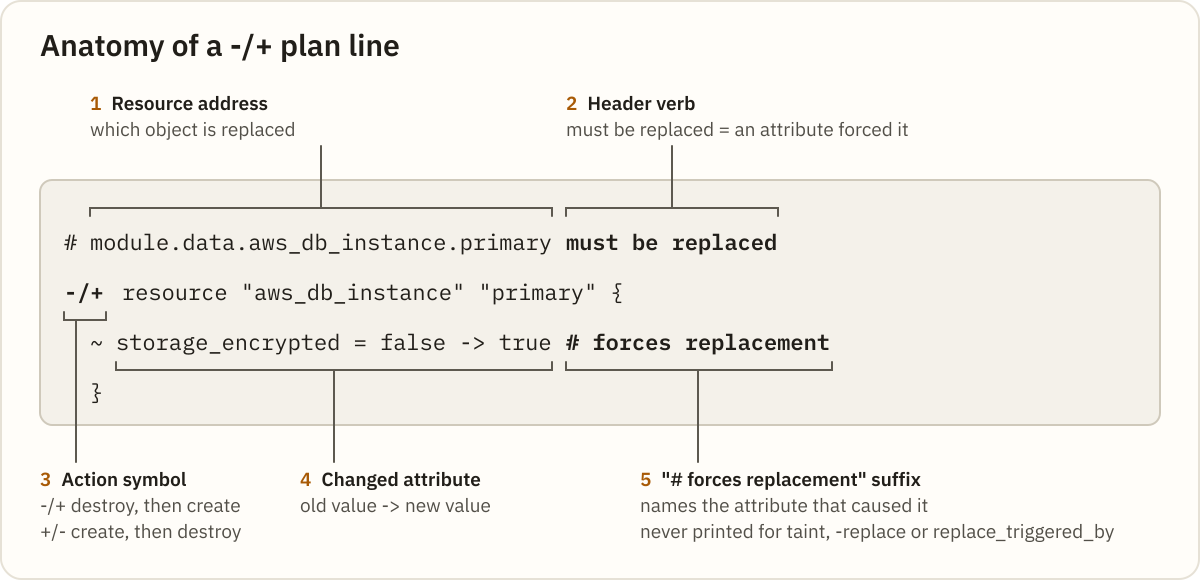
Destroy-then-create is the default. Terraform only switches to +/- when create_before_destroy applies to the resource. The header line above the resource matters as much as the symbol. must be replaced means an attribute forced it. The other verbs mean something else did, which is the next question.
Why is there no ”# forces replacement” line on some replacements?
Grepping the plan for forces replacement feels like a complete check. It is not. Terraform only prints that suffix on attributes the provider reported as requiring replacement. Three kinds of replacement have no such attribute, so the header verb is the only clue:
  # aws_instance.app is tainted, so must be replaced
  # aws_instance.app will be replaced, as requested
  # aws_instance.app will be replaced due to changes in replace_triggered_by
The first comes from terraform taint (now deprecated in favour of -replace), the second from terraform apply -replace=ADDRESS, the third from a replace_triggered_by lifecycle rule.
There is a fourth trap. If a provider flags an attribute that did not change as requiring replacement, Terraform can fold it into (N unchanged attributes hidden). That was reported as hashicorp/terraform#36097 and closed as working as designed. The plan says must be replaced and shows no culprit at all.
How do you find the attribute that forced the replacement?
Stop reading the human plan and read the machine one. Every replacement carries actions of ["delete","create"] or ["create","delete"] in the JSON plan format, plus an action_reason and, when an attribute was responsible, replace_paths.
terraform plan -out=tfplan
terraform show -json tfplan > plan.json
jq -c '.resource_changes[]
  | select(.change.actions | index("delete"))
  | {address, actions: .change.actions, reason: .action_reason, paths: .change.replace_paths}' plan.json
It lists every destroy or replacement. On a plan with three replacements, that prints one line each:
{"address":"module.data.aws_db_instance.primary","actions":["delete","create"],"reason":"replace_because_cannot_update","paths":[["storage_encrypted"]]}
{"address":"aws_lb_target_group.web","actions":["create","delete"],"reason":"replace_because_cannot_update","paths":[["port"]]}
{"address":"aws_instance.app","actions":["delete","create"],"reason":"replace_by_triggers","paths":null}
replace_paths is omitted when no attribute caused the replacement. A null there plus replace_by_triggers or replace_because_tainted means look at lifecycle rules or state, not the diff. HashiCorp calls these reasons display hints that may change, so treat an unfamiliar one as unspecified. You can try the filter against your own plan in the jq playground.
If you would rather not write jq during an incident, paste the plan into the Terraform Plan Summarizer. On its full RDS replace example (the plan above plus an in-place parameter group update) it reports plan text · 2 actions · 1 high risk · counts reconcile, and its Markdown report lists:
- `module.data.aws_db_instance.primary` — destroy then create — forces replacement: storage_encryptedIts honest limit: from plan text it flags taint, -replace and trigger replacements, but can only name attributes Terraform printed with # forces replacement. For a hidden culprit or the exact reason, paste terraform show -json tfplan instead.
Which cause is yours?
Once you know the reason and the path, the cause is usually one of six, in rough order of how often they bite.
| What you see | Likely cause | First move |
|---|---|---|
false -> true # forces replacement on a line you edited | Immutable attribute changed | Revert, or plan a migration |
-> (known after apply) # forces replacement | Unknown upstream value | Trace the reference |
| Replacement with no config change | Drift or normalisation | terraform plan -refresh-only |
| Plan changed when the lock file did | Provider upgrade | Read the provider CHANGELOG |
tainted / as requested header | Taint or -replace | Check state |
replace_triggered_by header | Lifecycle trigger | Check the trigger’s scope |
The value changed in your config
1. You edited an immutable attribute. The tell is a concrete old -> new value with the suffix. The fix is to revert, or accept the replacement as a planned migration (for RDS encryption, that means a snapshot and restore you control). Verify with a fresh plan that the resource shows ~ update in-place or nothing.
2. The value is (known after apply). The tell is <before> -> (known after apply) # forces replacement. In providers built on plugin SDKv2, which covers most of hashicorp/aws, a ForceNew argument whose new value is unknown is marked as requiring replacement even if the final value turns out identical.
The upstream is often another resource being replaced, or a depends_on that the depends_on docs warn makes more values unknown. Fix it by referencing a stable attribute, or by using expression references instead of depends_on. Verify that the line shows a concrete value.
The replacement came from outside the diff
3. Drift or normalisation. The tell is a replacement nobody asked for, where the API returned a value in a different shape than the config wrote. Run terraform plan -refresh-only to see what changed outside Terraform, then make the config match what the API returns.
4. A provider upgrade. The tell is that the plan changed the day the lock file did. Read the provider’s CHANGELOG and upgrade guide for the resource type before assuming your config is at fault.
5. Taint or -replace. The tell is the header verb and replace_because_tainted or replace_by_request. If nobody meant it, clear the taint:
terraform untaint ADDRESS6. replace_triggered_by. Available since Terraform v1.2, it replaces a resource when a referenced managed resource changes. Only managed resources can be referenced, so a plain variable goes through terraform_data (v1.4+). Check whether the trigger is broader than intended.
How do you prevent a replacement without breaking something else?
When the replacement is real but the order is the problem, create_before_destroy turns -/+ into +/-. The docs call it opt-in “because many remote object types have unique name requirements”. A target group with a fixed name shows why: names must be unique per region per account, so while the old one exists, the ELBv2 API rejects the create with DuplicateTargetGroupName.
Swap name for name_prefix (at most 6 characters for a target group) so each replacement gets a unique suffix:
resource "aws_lb_target_group" "web" {
  name_prefix = "web-"
  port        = 9090
  protocol    = "HTTP"
  vpc_id      = var.vpc_id

  lifecycle {
    create_before_destroy = true
  }
}
Gotcha: Terraform propagates
create_before_destroyto the resources acreate_before_destroyresource depends on, so a+/-can appear on a resource whose own block never set it.
If the replacement came from a refactor such as moving from count to for_each, nothing about the remote object changed. Use a moved block (Terraform v1.1+) and the plan shows has moved to instead of destroy and create:
moved {
  from = aws_instance.c[0]
  to   = aws_instance.c["small"]
}
For anything holding data, add a guard. prevent_destroy rejects any plan that would destroy the object, including a forced replacement (file and line context trimmed):
Error: Instance cannot be destroyed

Resource module.data.aws_db_instance.primary has lifecycle.prevent_destroy set, but the plan calls for this resource to be destroyed. To avoid this error and continue with the plan, either disable lifecycle.prevent_destroy or reduce the scope of the plan using the -target option.
Important:
prevent_destroydoes not stop a destroy if someone deletes the resource block itself. It also blocksterraform destroy, and lifecycle arguments accept only literal values.
Is ignore_changes the fix that isn’t a fix?
ignore_changes is the most common answer on forums, and it does make the -/+ go away. The lifecycle docs say ignored arguments are considered when planning a create but ignored when planning an update.
That is the problem. Ignoring a ForceNew attribute suppresses the replacement and every future diff on it. If someone later changes that attribute outside Terraform, the plan never mentions it again. Your config now says one thing, the real object says another, and nothing reports the gap. With ignore_changes = all, that silence covers the whole resource.
Use it for attributes another system legitimately owns, such as a tag written by a scheduler. Do not use it to make a scary plan quiet. If the attribute is yours, the honest options are reverting the change or replacing on purpose.
How do you make CI fail when a plan replaces a database?
Human review misses a -/+ in a long plan. A pipeline does not. This filter exits non-zero whenever the plan deletes a data store, whether by destroy or replacement:
terraform show -json tfplan > plan.json
jq -e '[.resource_changes[]
  | select((.change.actions | index("delete"))
      and (.type | test("^aws_(db_instance|rds_cluster|dynamodb_table|s3_bucket|efs_file_system)$")))]
  | length == 0' plan.json
On the plan above it prints false and exits 1. On a clean plan it prints true and exits 0. Run it as a required step before apply, and make overriding it a deliberate, reviewed action.
Tip: Keep the type list next to the pipeline and extend it with whatever holds state in your account. The AWS for DevOps engineers guide covers RDS backups and manual snapshots, your safety copy before any planned replacement.
The same gate slots into any runner. If your pipeline lives in GitHub Actions, pair it with the checks in GitHub Actions security misconfigurations. On GitLab, validating .gitlab-ci.yml keeps the job that runs it from breaking silently.
What should you check before approving a -/+ plan?
- Read the header verb, not just the symbol:
must be replaced,is tainted,as requestedandreplace_triggered_bypoint to different causes. - Run
terraform show -json tfplanand list every resource whoseactionsincludedelete, withaction_reasonandreplace_paths. - For each
replace_paths, confirm the attribute really is immutable for that resource type. - For
(known after apply), trace the reference to the resource that makes it unknown. - For a replacement with no config change, run
terraform plan -refresh-onlyand check the provider changelog. - For a refactor, add a
movedblock and re-plan until the destroy disappears. - For
create_before_destroy, confirm names can coexist, or switch toname_prefix. - Confirm every data store carries
prevent_destroyand that CI runs the jq gate.
Next time a plan says -/+, paste it into the Terraform Plan Summarizer before anyone clicks approve.
What is the replacement that got furthest through your review before somebody noticed the -/+?
Related posts
-
8 min read
chown command in Linux: change file owner and group
The chown command in Linux explained: user:group syntax, chown -R and symlinks, --reference, chgrp, chmod vs chown, and fixing Docker volume permission errors with numeric IDs.
-
10 min read
chmod command in Linux: syntax, examples and common mistakes
The chmod command in Linux explained: octal and symbolic modes, chmod +x, chmod -R and its traps, setuid, setgid and sticky bits, umask, and how to fix Permission denied.
-
6 min read
GitHub Actions cron runs in UTC: convert your schedule and check the real next run time
GitHub Actions cron timezone UTC explained: why schedule: cron: always fires on UTC, how DST shifts the wall-clock time, and how to check the real next run.