IR-08 · security
Pushkar Kumar 12 min read
Unable to get local issuer certificate: curl, git, npm, pip
Why curl, git, npm and pip print unable to get local issuer certificate, which trust store each one reads, and the fixes that add a CA instead of replacing it.
On this page
- What does “unable to get local issuer certificate” mean?
- Why does the same URL fail in one client and work in another?
- Which trust store does each client read?
- How do you confirm which cause you have?
- What causes it, ranked?
- Cause 1: is a TLS-inspection proxy re-signing your traffic?
- Cause 2: is the server missing its intermediate?
- Cause 3: why does it fail only inside a Docker image?
- Why isn’t -k, GIT_SSL_NO_VERIFY or strict-ssl=false a fix?
- What should you check, in order?
You clone a repository on your first morning at a new job, and the command stops at the handshake:
curl: (60) SSL certificate problem: unable to get local issuer certificate
More details here: https://curl.se/docs/sslcerts.html
Then git clone, npm install and pip install fail too. The browser still loads the page. “Unable to get local issuer certificate” is one OpenSSL error, but every client checks it against a different trust store, and that is why the same fix works for one tool and not the next.
TL;DR
- The error is OpenSSL’s code 20: the chain stops at a certificate whose issuer is not in this client’s trust store.
- Run
openssl s_client -showcertsagainst the host and read thei:lines. One certificate: a missing intermediate. A corporate or vendor issuer: a TLS-inspection proxy.- curl, git, Node/npm and pip each read a different store, so installing a CA in one place rarely fixes all four.
--cacert,http.sslCAInfoand npmcafilereplace the store.NODE_EXTRA_CA_CERTSappends.
What does “unable to get local issuer certificate” mean?
The server sends a leaf certificate and, if configured well, the intermediates. Your client builds a chain upward from the leaf and needs the top of it to be a root it already holds locally. OpenSSL raises error 20, X509_V_ERR_UNABLE_TO_GET_ISSUER_CERT_LOCALLY, when the top certificate is not self-signed and no issuer for it exists in the local store.
That covers two different situations. If the server sent only the leaf, the chain stops at depth 0 because the intermediate is missing. If the leaf and intermediate arrived but the root is not in your store, the chain stops at depth 1 or 2. That is the private-CA and proxy case.
Its neighbours in OpenSSL’s x509_txt.c are worth recognising:
18  self-signed certificate
19  self-signed certificate in certificate chain
20  unable to get local issuer certificate
21  unable to verify the first certificate
A proxy that also sends its own root produces 19 instead of 20. The mechanism behind all of them is the chain walk explained in x509: certificate signed by unknown authority, which is Go’s wording of the same failure.
Why does the same URL fail in one client and work in another?
curl, git and Python on Linux or macOS stop at the first verification error, so a leaf-only server gives them code 20. openssl s_client keeps going: against incomplete-chain.badssl.com it prints num=20, then num=21, and ends with Verify return code: 21 (unable to verify the first certificate).
Node reports the last error instead. A leaf-only server therefore shows up in Node 24.16.0 as unable to verify the first certificate (UNABLE_TO_VERIFY_LEAF_SIGNATURE), and Node itself suggests trying --use-system-ca if the root CA is installed locally. When npm or Node prints UNABLE_TO_GET_ISSUER_CERT_LOCALLY, the intermediates arrived and the root is missing from Node’s store, which is the proxy or private-CA signature.
Windows differs again. Git for Windows’ own curl 8.4.0 and the System32 curl.exe both use Schannel, and both returned 200 for the same incomplete chain, because Schannel fetches missing intermediates and reads the Windows store. python.org’s Python 3.13 on Windows passed too. What fails is git itself, which Git for Windows sets to http.sslBackend=openssl, plus WSL and containers.
| What you see | Where | Most likely cause |
|---|---|---|
Error 20, browser fine, s_client shows one certificate | curl, git, pip | Server missing its intermediate |
| Every HTTPS host fails, only on the office network or VPN | any client | TLS-inspection proxy |
UNABLE_TO_GET_ISSUER_CERT_LOCALLY | npm, Node | Proxy or private CA |
unable to verify the first certificate | npm, Node | Server missing its intermediate |
| Works with Windows/Schannel curl, fails in git, WSL or a container | Windows | Schannel repaired the chain or trusts the Windows store |
Fails only in docker build or a container | image | Image trust store lacks the CA |
Which trust store does each client read?
Most fix lists skip this. No single “system trust store” serves every tool: each client has its own default and its own override, with different semantics.
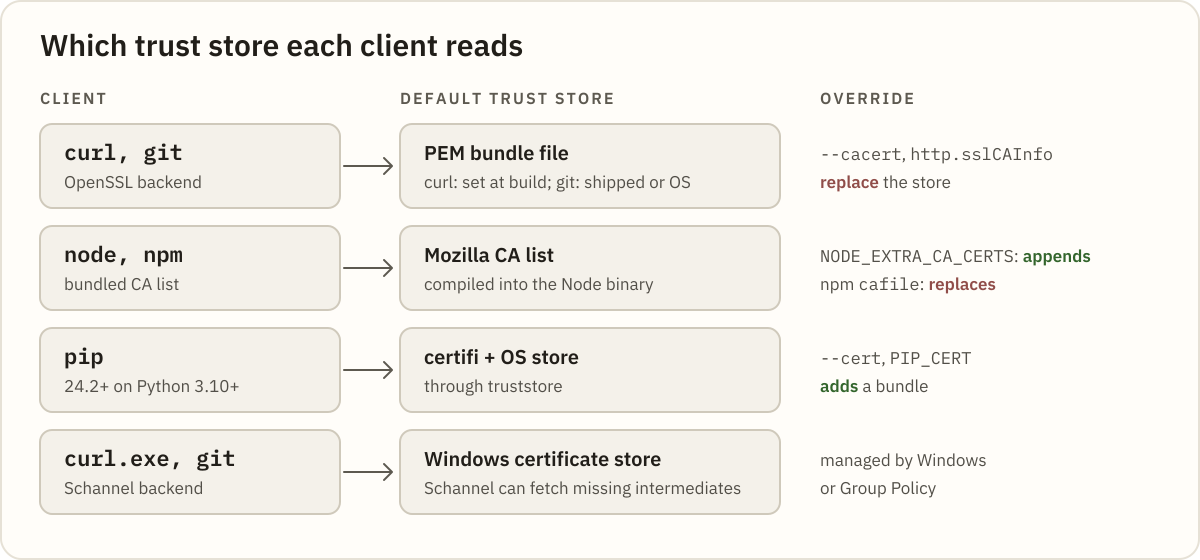
| Client | Default store | Override, and what it does |
|---|---|---|
| curl (OpenSSL build) | CA bundle file chosen at build time | --cacert, CURL_CA_BUNDLE: replace |
| git, openssl backend | The bundle Git ships or the OS bundle | http.sslCAInfo, GIT_SSL_CAINFO: replace |
| Node, npm | Mozilla CA list fixed when Node was released | NODE_EXTRA_CA_CERTS: appends. npm cafile: replaces |
| pip 24.2+ on Python 3.10+ | certifi plus the OS store | --cert, PIP_CERT: add a bundle |
| requests | certifi | REQUESTS_CA_BUNDLE: replaces |
| curl.exe, git with schannel | Windows certificate store | Managed by Windows or Group Policy |
Node does not read the OS store by default (Node CLI docs), so installing a corporate CA into Windows, macOS or Debian does not fix npm. --use-system-ca (v23.8.0 and v22.15.0, Linux from v23.9.0) and NODE_USE_SYSTEM_CA=1 (v24.6.0 and v22.19.0) change that. For Python, requests passes certifi’s path explicitly, so SSL_CERT_FILE does not reach it.
pip differs: under truststore, --cert adds. pip 26.0.1 on Python 3.13 still reached PyPI with --cert set to one unrelated root; with --use-deprecated=legacy-certs the same command failed with this error.
Gotcha: a “replace” override pointed at a file holding only your corporate CA fixes the proxied host and breaks every public one. With
GIT_SSL_CAINFOset to a single-root file,git ls-remote https://github.com/git/git.gitfails with this same error. Point replace-style options at a full bundle that also contains your CA.
How do you confirm which cause you have?
Ask the server what it sends, using the host your client called. Keep -servername so SNI picks the right certificate:
openssl s_client -connect registry.npmjs.org:443 -servername registry.npmjs.org -showcerts </dev/nullRead the numbered s: (subject) and i: (issuer) pairs:
- One certificate, public issuer,
depth=0on the error line: a missing intermediate on the server. - Top issuer is your employer or a security vendor such as Zscaler: a TLS-inspection proxy, even when only the leaf arrived.
To read the chain without squinting at PEM, paste the whole transcript into the Certificate Decoder; it ignores the text around the certificates.
For a leaf-only capture of incomplete-chain.badssl.com it raises a missing intermediate error and names what is absent: The chain is missing the intermediate that issued *.badssl.com: "C=US, O=Let's Encrypt, CN=YR2". Its message says runtimes fail with “unable to get local issuer certificate”. Node is the exception from the section above.
The honest limit: the decoder cannot see your client’s trust store. If the proxy sends its intermediate, the chain is internally valid and reports chain order OK · 1 signature verified, root not included. A leaf-only proxy gets missing intermediate, but a corporate issuer still means proxy, not a server bug. Either way, read the issuer name.
What causes it, ranked?
Three causes, starting with the one most common on corporate networks. Each has a tell, a fix and a check.
Cause 1: is a TLS-inspection proxy re-signing your traffic?
In corporate networks this is the usual culprit, and the npm CLI team’s first guess in npm/cli#7326: “This is usually because of a proxy you are in that is not providing valid ssl certificates.” The proxy terminates TLS and re-signs inspected sites with its own CA. Your browser trusts that CA through IT policy; your command-line tools do not.
Tell: every public host fails, the top issuer in s_client is a corporate or vendor CA, and npm says UNABLE_TO_GET_ISSUER_CERT_LOCALLY:
npm error code UNABLE_TO_GET_ISSUER_CERT_LOCALLY
npm error errno UNABLE_TO_GET_ISSUER_CERT_LOCALLY
npm error request to https://registry.npmjs.org/serve failed, reason: unable to get local issuer certificate
pip wraps the same OpenSSL text; the _ssl.c line number varies by Python build:
[SSL: CERTIFICATE_VERIFY_FAILED] certificate verify failed: unable to get local issuer certificate (_ssl.c:1028)Fix: get the proxy’s root certificate from IT (as PEM), install it once, then give each client an option that keeps the public roots:
# Debian/Ubuntu/WSL: add the root to the OS bundle (.crt extension required)
sudo cp corp-root.pem /usr/local/share/ca-certificates/corp-root.crt
sudo update-ca-certificates

# curl and git: point at the full bundle, which now includes the corporate root
curl --cacert /etc/ssl/certs/ca-certificates.crt https://registry.npmjs.org/
git config --global http.sslCAInfo /etc/ssl/certs/ca-certificates.crt

# Node and npm: append to Node's own list instead of replacing it
export NODE_EXTRA_CA_CERTS="$HOME/corp-root.pem"

# pip and requests
export PIP_CERT=/etc/ssl/certs/ca-certificates.crt
export REQUESTS_CA_BUNDLE=/etc/ssl/certs/ca-certificates.crt
On Git for Windows, git config --global http.sslBackend schannel makes git use the Windows store, which IT has often already populated. pip 24.2 and later on Python 3.10+ also read the OS store alongside certifi (pip docs).
Important:
NODE_EXTRA_CA_CERTSis read only when the process starts, and Node ignores it when an explicitcais set. npm’scafilebecomes thatcaoption, so setting both silently drops the extra certificates. PreferNODE_EXTRA_CA_CERTS.
Verify: openssl s_client -connect registry.npmjs.org:443 -servername registry.npmjs.org -CAfile /etc/ssl/certs/ca-certificates.crt </dev/null should end with Verify return code: 0 (ok). Then rerun the original command. Python 3.13 enables VERIFY_X509_STRICT, so an old home-made proxy CA can still fail there with a different error once it is trusted.
Cause 2: is the server missing its intermediate?
Tell: s_client shows one certificate, the error sits at depth=0, the browser loads the page and Node says unable to verify the first certificate. git prints it like this:
fatal: unable to access 'https://incomplete-chain.badssl.com/x.git/': SSL certificate problem: unable to get local issuer certificateFix: on the server. The certificate file must hold the leaf followed by every intermediate, which for Let’s Encrypt means fullchain.pem, not cert.pem.
The x509 post’s first cause has the nginx lines. If you do not own the server, send its owner the s_client output. Adding the intermediate to your own bundle only hides a bug that every other OpenSSL client will hit.
Verify: rerun s_client; you should see at least two certificates and Verify return code: 0 (ok).
Tip: for an internal Git server signed by a private CA, scope the option to that host:
git config --global http.https://git.corp.example/.sslCAInfo ~/corp-ca-bundle.pem. Public remotes keep using the default bundle, so a single-root file is safe there.
Cause 3: why does it fail only inside a Docker image?
A container carries its own trust store, and the host’s corporate CA does not follow it in. Inside docker build, npm and pip fail against the same proxy your laptop already trusts. If the image has no bundle at all, start with the x509 post’s container section.
Tell: the command succeeds on the host and fails in a RUN step or a running container. Reading which RUN failed is covered in docker build “failed to solve”.
Fix: add the root with a .crt name (update-ca-certificates silently skips .pem, per the Debian man page), then tell Node and requests where the regenerated bundle is:
COPY corp-root.pem /usr/local/share/ca-certificates/corp-root.crt
RUN update-ca-certificates
ENV NODE_EXTRA_CA_CERTS=/etc/ssl/certs/ca-certificates.crt
ENV REQUESTS_CA_BUNDLE=/etc/ssl/certs/ca-certificates.crt
update-ca-certificates alone does not help Node, which keeps its compiled-in list. On RHEL or UBI images, copy the root to /etc/pki/ca-trust/source/anchors/ and run update-ca-trust extract.
Verify: docker run --rm <image> ls /etc/ssl/certs/ca-certificates.crt, then rerun the failing step.
Why isn’t -k, GIT_SSL_NO_VERIFY or strict-ssl=false a fix?
Every client has an off switch: curl -k, GIT_SSL_NO_VERIFY=true, npm config set strict-ssl false, NODE_TLS_REJECT_UNAUTHORIZED=0 and pip’s --trusted-host. They make the error disappear by removing the check that raised it, for every host the command touches.
Behind a TLS-inspection proxy, that check is the only thing that tells your proxy apart from anyone else in the same position. With it off, an install accepts whatever certificate it is handed. curl’s own guidance on --insecure is to never skip verification in production.
The real fix is one CA file and one variable. Treat strict-ssl=false in a shared .npmrc or CI template as a finding, not a setting to copy.
What should you check, in order?
- Run
openssl s_client -showcertsagainst the exact host and count the certificates. - One certificate and
depth=0: the server is missing its intermediate. Fix it there. - Top issuer is a corporate or vendor CA: get that root as PEM from IT.
- Install it in the OS store, with a
.crtname on Debian-family systems. - Give each client a full bundle or an append option:
http.sslCAInfo,NODE_EXTRA_CA_CERTS,PIP_CERT,REQUESTS_CA_BUNDLE. - Never point a replace option at a file holding only the corporate root.
- In images, repeat steps 4 and 5 in the Dockerfile.
- Confirm
Verify return code: 0 (ok), then remove any-korstrict-ssl=falseleft behind.
Next time a handshake fails, paste the s_client output into the Certificate Decoder and read the issuer before touching any setting.
Which client in your stack was the last one to learn about the corporate CA, and how long did it take anyone to notice?
Related posts
-
9 min read
x509: certificate signed by unknown authority — the fix
What the error actually means, the four causes ranked by how often they bite, and the one-line openssl check that shows whether an intermediate is missing.
-
8 min read
chown command in Linux: change file owner and group
The chown command in Linux explained: user:group syntax, chown -R and symlinks, --reference, chgrp, chmod vs chown, and fixing Docker volume permission errors with numeric IDs.
-
10 min read
chmod command in Linux: syntax, examples and common mistakes
The chmod command in Linux explained: octal and symbolic modes, chmod +x, chmod -R and its traps, setuid, setgid and sticky bits, umask, and how to fix Permission denied.